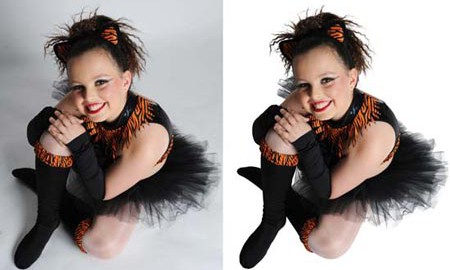
A technique that removes the background from images that have subjects with fuzzy edges, like hair, wool, or fur. 

Image masking is a technique that removes the background from images that have subjects with fuzzy edges, like hair, wool, or fur. It is a labor-intensive task that requires advanced Photoshop techniques to account for every last strand of hair or fur.

For hard edges, the clipping path technique is used, and for the furry or soft edges image masking is used. In the situation, where it cannot be possible to grab more accurate details of soft edges with the clipping path technique alone, the image masking method is called upon to isolate the object from the background including layer masking & so on.

Image masking allows you to change the background behind the subject of your image. You can create white backgrounds for selling products online, or display your subjects in any setting.

Let us know what to do with your images

Here's How It Works

This is the way we make it simple to get quick, reasonable product photo edits - all done by hand by pro designers.

Request Quote

You are mentioned to follow these simple steps referenced underneath.

Kindly go to our landing page where you can find the request quote. Click on it to visit our request quote page.

You would find a form, fill up this form and click on the upload button for uploading your pictures.

Presently click on Submit Button, and you are finished.

Your request quote will be answered rapidly after analyzing the job by our 24/7 based customer support team.

Place Order

Assuming you need our photograph altering services by our top-class photograph retoucher, observe the basic guidelines portrayed below which we have made simple for your benefit.

  • No need to register or sign in.
  • Simply go to Submit Order page.
  • Follow the directions mentioned below.
  • Fill in the entirety of the necessary fields.
  • Make your file Zip Add files by tapping on the upload button.
  • Click Submit button to Submit your order.

Pay Your Bill

To make a payment to Photos, please go to my order link, then click on the PayPal link on each order which hasn’t paid. The client can pay on PayPal by using a Credit Card or a Bank Account with some simple clicks on the Payment Page. Or Just go to the PayPal link below to make a payment. Thank You.

Download Image

All finished images are sent to you via your email. Check your email for complete notification, Login to your account, and download the finished images using your suitable media.